MIUI Fastboot ROM Flash
Pre-requisite to Flash Fastboot ROM
- Perform a total backup of all your important data.
- Make sure you unlock the bootloader of your phone.
- Setup the ADB and Fastboot drivers on your Windows PC.
- Download Xiaomi MI Flashtool here and install it on your Desktop.
- And last, make sure that your phone’s battery is 70% charged.
How To Flash MIUI 9 or MIUI 10 Fastboot ROM Quickly
1. Download the Latest MIUI Fastboot ROM for your Phone here and unzip the folder on your desktop.
2. Now download the ADB drivers and Mi Flash tool on your windows from the above mention links.
3. Open the MI Flash tool on your desktop and boot your phone into fastboot mode. To do this first turn off your phone and Hold down the Volume Down button + Power button for few seconds.
4. Now your Xiaomi phone will boot in the fastboot mode and you will see the MI Bunny on the screen of your phone.

4. Once your phone in fastboot mode, connect your phone to the PC with the USB cable.
5. Next, go to MI flashing tool and tap on ‘Refresh’ button to see the connected devices.
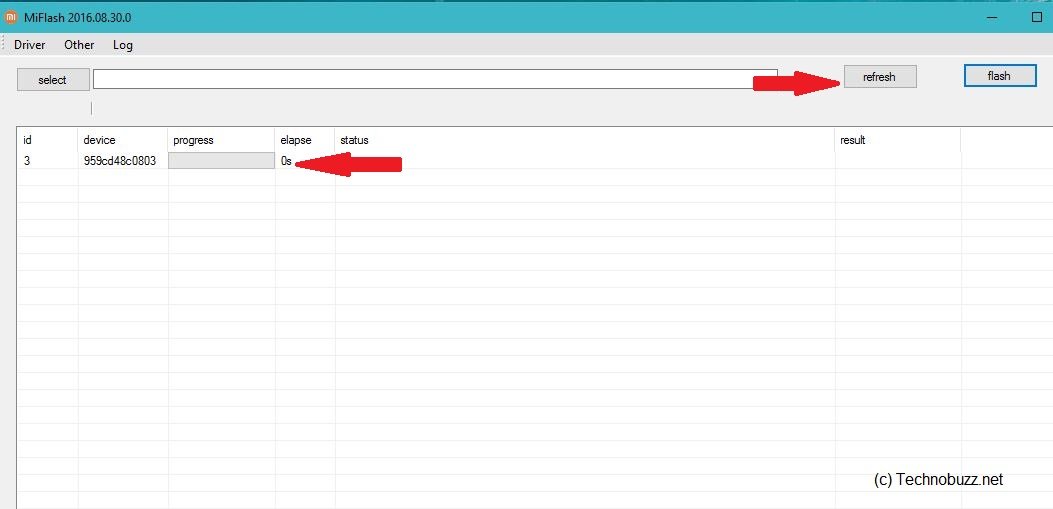
6. Now go the Extracted MIUI Fastboot folder and copy the path of the folder.

7. Now go back to the Flash tool and paste that path in the “Select” Option.

8. Now in the right bottom of your MI flash tool, you will see three option “clean all”, “save user data” and “clean all and lock”. From here check the Clean all option. If you don’t want to Delete Data from your phone then chose “Save user data” option, in case if you want to Lock the bootloader of your phone then choose “Clean all and Lock” option.

9. Now Tap on ‘Flash’ at the top right to start the flashing process.

10. Now this will flash the Fastboot MIUI ROM on your phone. Once complete you will see the “Success” message on the screen, And you your phone will reboot.


Comments
Post a Comment